Scaling the Software
Database Sharding
We knew that database sharding was an essential component of effective scaling. To see why, visit the Project Outline tab. After identifying the need for sharding, we needed to determine the best way to implement it for our system. Through research, we considered three different sharding strategies:
Geographic Sharding
Geographic sharding partitions data based on user location, storing it in regional databases. This method is particularly useful when data residency laws require user data to be stored within specific geographic boundaries—such as the GDPR regulations in the European Union, which mandate that personal data of EU citizens must be processed within the region.
A major advantage of geographic sharding is reduced latency for users, as their data is stored physically closer to them, making queries faster. However, we wanted to test whether distance had a significant impact on performance in our specific system.
To do this, we used a VPN in Australia (the farthest location we could test from our database) and another in Chicago (close to our database). Our tests showed no noticeable difference in response time from the user’s perspective. Since our data storage location did not introduce significant latency issues, we ruled out geographic sharding as a necessary solution.
Range-Based Sharding
Range-based sharding involves dividing data into shards based on a specific attribute’s value range. For example, users with IDs 1–10,000 might be stored in one shard, while those with IDs 10,001–20,000 would be stored in another.
The benefits to range-based sharding include that it is simple to implement— the rules for which data belongs to which shard are straightforward, and new shards can be added or removed without affecting existing ones.
However, hotspots can form, meaning certain shards may become overloaded if many users fall into the same range. Hotspots occur when one range of data is accessed more frequently than others, which can negate the benefits of sharding by creating load imbalances. Since preventing hotspots was a top priority, we decided that range-based sharding was not a suitable approach for our system.
Hash-Based Sharding
Hash-based sharding distributes data evenly across shards using a hash function. Instead of assigning data based on a fixed range, a hash function is applied to a key (such as username), and the output determines which shard the data is stored in.
The benefits to hash-based sharding include that it helps prevent hotspots by distributing data relatively evenly across shards, reducing the risk of any single shard becoming overloaded.
A downside of hash-based sharding is that if a new shard is needed, the existing data must be redistributed.
Despite the need for rehashing when scaling up, we determined that hash-based sharding was the best solution for our system because it effectively prevented hotspots and helped to evenly distribute the data.
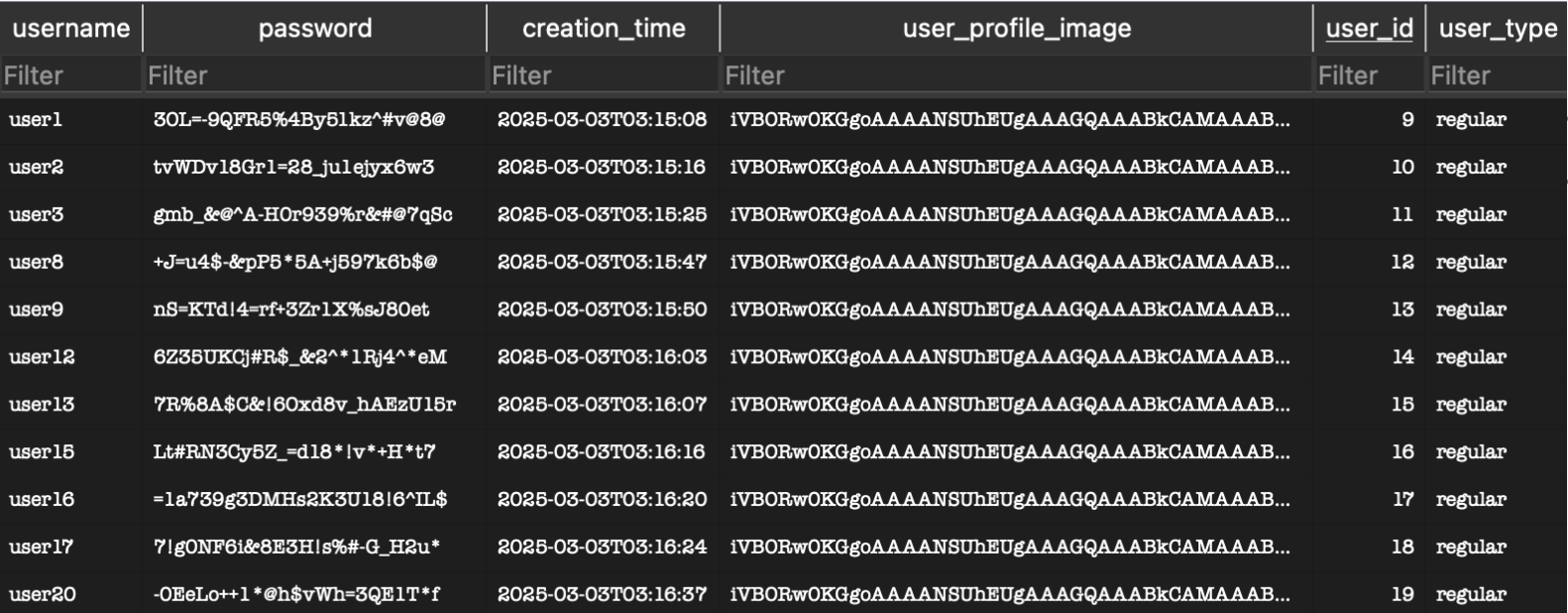
We implemented hash-based sharding by hashing usernames and distributing users across two separate databases. To demonstrate our approach, we registered 20 users and observed how they were distributed. Here is the distribution of the two databases:
Database 1:
Database 2:
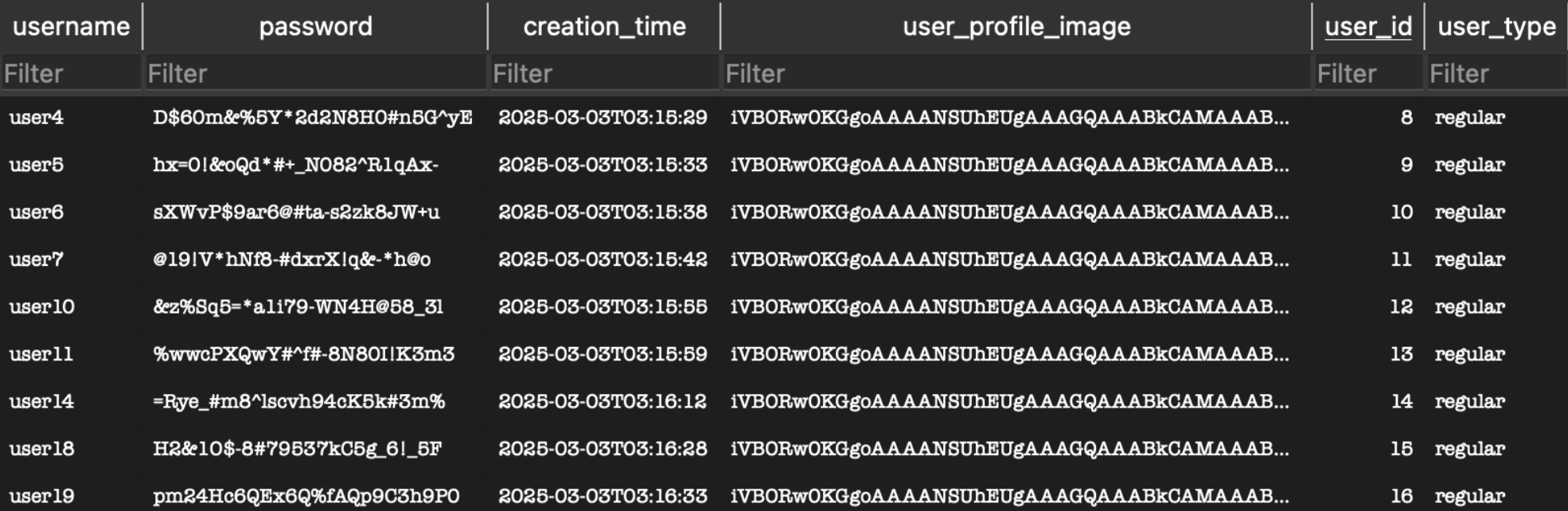
Our implementation of hash-based sharding successfully achieved our scaling goals.
Rate Limiting and Throttling
When scaling web services and APIs, managing traffic and ensuring system stability is paramount. To achieve this, rate limiting and throttling are employed to control the flow of requests and prevent system overload. There are various policies available for rate limiting and throttling, each with its own strengths and use cases.
Rate Limiting Policies
Rate limiting is the process of restricting the number of requests a client can make to a server within a specific time frame. Among the different strategies, we have chosen the Fixed Window Policy for its simplicity and ease of implementation and testing.
- Fixed Window Policy: This approach divides time into fixed intervals, or "windows," and allows a predefined number of requests within each window. For example, if the limit is set to 100 requests per minute, the counter resets at the start of each new minute. This method is straightforward and predictable, making it ideal for scenarios where simplicity is a priority. However, it can lead to burst traffic at the beginning of each window.
- Sliding Window Log: Tracks individual request timestamps and calculates the rate within a rolling time window. This approach is more precise but requires more storage.
- Token Bucket: Uses tokens that are added to a bucket at a fixed rate. Each request consumes a token, and once the bucket is empty, requests are denied.
Throttling Policies
Throttling is the process of regulating the rate at which requests are processed to prevent overloading system resources. Unlike rate limiting, which restricts the total number of requests over a period of time, throttling focuses on controlling the concurrency of active requests, ensuring that the system does not exceed its capacity and that requests are not dropped.
- Concurrency Limiter: This policy sets a hard limit on the number of concurrent requests that can be processed at any given time. If the limit is reached, additional requests are queued or rejected until the current requests are completed. This approach is highly effective in managing resource-intensive operations and protecting system stability.
- Queue-Based Throttling: Requests are queued and processed at a controlled rate.
By implementing the Fixed Window Policy for rate limiting and the Concurrency Limiter for throttling, we achieve a balance between simplicity, efficiency, and system protection.
In order to implement this in our code, we used a middleware pacakage called "RateLimiting" (documented by Microsoft here). This middleware helped us implement both rate limiting and throttling as it contained fixed-window policies as well as concurrency policies.
The user, should they be rate limited, is given a pop up error. Specfically a HTTP 429 error. 429 is the standard error sent to indicate that a user is sending too many requests and needs to slow down.
Rate Limiting Live Example:
In this example, we have purposely lowered the threshold at which rate limiting kicks in to 2 requests per 10 seconds. Clicking the "Chess" button at the top sends more than 2 requests, and thus we get rate limited and a 429 error is shown.
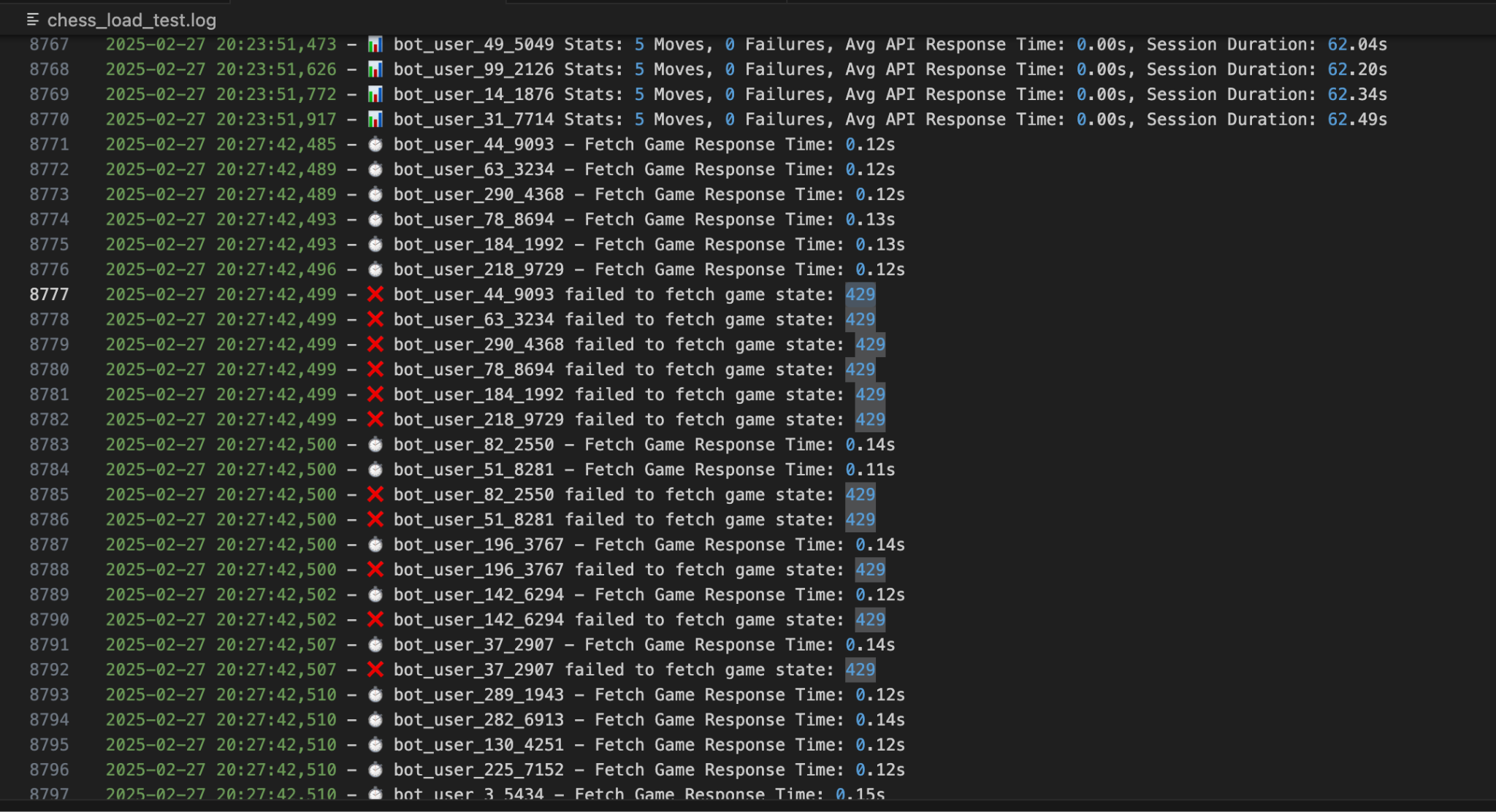
In order to test our rate limiting, we used bots(which were part of out load testing suite) to reach the rate limit. Below shows the results of the test, at the exact point where the bots started to report that they were running into 429 errors. Initially, they show 0 failures, but on line 8777, we see out first bot that gets a 429 error.
Rate Limting Test Image:
Load Testing
We saw that load testing was crucial for making sure that our system could handle increasing traffic while maintaining performance and stability. After seeing the need for load testing, we explored different methods to simulate high user activity and assess our system's performance under heavy load. Through testing, we came up with the following methods:
Simulated User Load
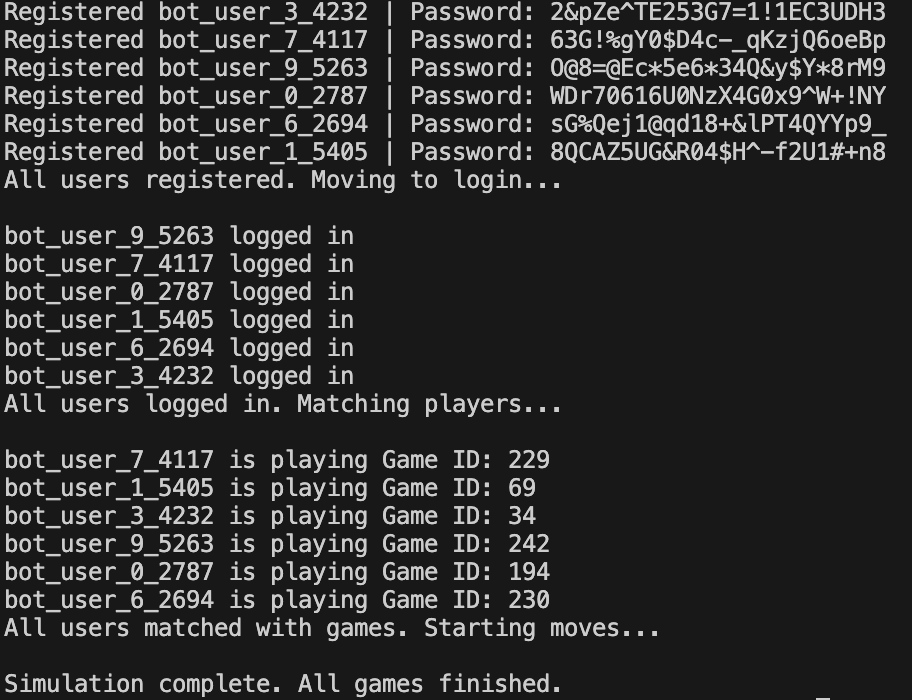
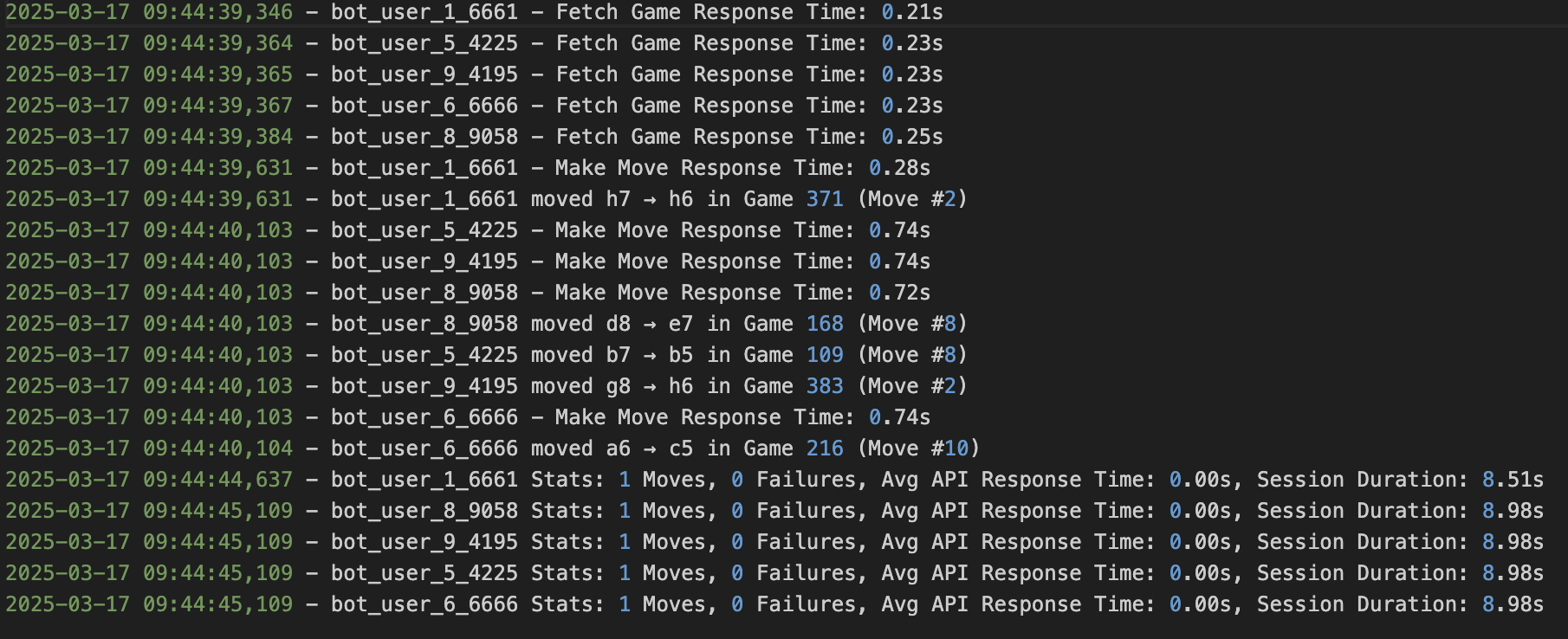
Simulated user load testing involves creating virtual bot users that perform real gameplay actions such as registering, logging in, making moves, and joining games. This allows us to measure response times and API efficiency under different traffic conditions.
One of the key advantages of simulated load testing is its ability to simulate real-world scenarios without affecting actual players.
To achieve this, we created python load testing script that:
- Registers and authenticates bot users dynamically based on test parameters.
- Assigns users to games while keeping bot activity separate from real players.
- Tracks API response times, errors, and performance bottlenecks.
Stress Testing
Stress testing examines how the system performs under extreme conditions, pushing it beyond typical usage levels to find out where our failure points are, and see how many users our system can support at the same time before crashing.
We implemented stress testing by:
- Gradually increasing the number of bot users and the frequency of moves.
- Measuring response times and system behavior under increasing load.
- Identifying bottlenecks and optimizing resource allocation.
Instead of using external monitoring tools, we manually logged our info to track API performance and detect issues in real time.
User and Game Type
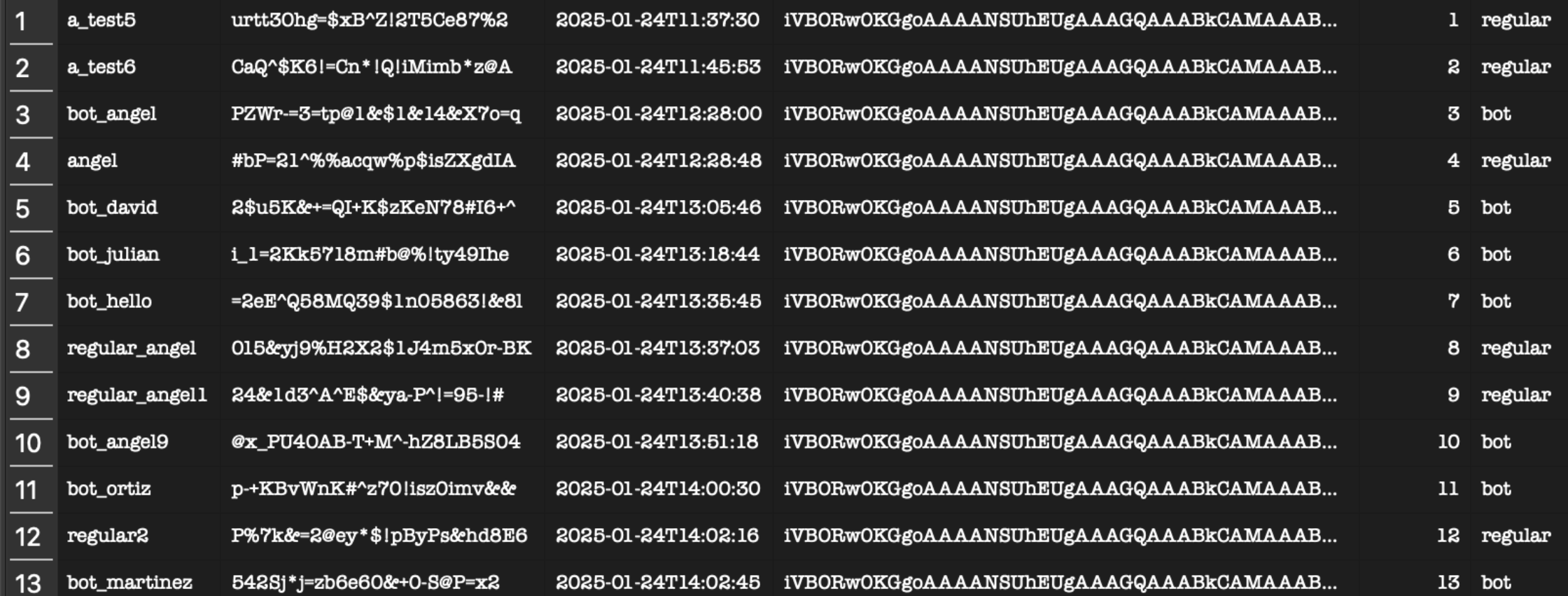
To make sure that real players using our service were not affected by test bot activity, we implemented a distinction between test data and actual gameplay. We did this by adding two fields to our database:
| Category | Description |
|---|---|
| User Type | Separates regular users (who track progress) from bot users (who execute scripted actions for testing). |
| Game Type | Distinguishes between standard games (competitive matches) and load test games (used only for performance evaluation). |
This implementation allowed us to maintain a fair experience for real users while running large-scale simulations.
With these methods we successfully:
- Simulated realistic player behavior at scale.
- Identified and optimized performance bottlenecks.
- Maintained a seamless experience for real players while running intensive load tests.