Assignment 4 - Tic Tac Toe
Due: Saturday, February 1, 2020, at 5pm
You may work alone or with a partner, but you must type up the code yourself. You may also discuss the assignment at a high level with other students. You should list any student with whom you discussed the assignment, and the manner of discussion (high-level, partner, etc.) in a readme.txt file that you include with your submission.
You should submit your assignment as a .zip file on Moodle.
You will do all of your work in a single file, tictactoe.py. You should download this “skeleton” version, and save it as tictactoe.py in a folder that also has graphics.py.
Parts of this assignment:
- Problem 1: Placing pieces
- Problem 2: Keeping track of game state
- Problem 3: Checking for valid positions
- Problem 4: Ending the game
Note on style:
The following style guidelines are expected moving forward, and will typically constitute 5-10 points of each assignment (out of 100 points).
- Variable names should be clear and easy to understand, should not start with a capital letter, and should only be a single letter when appropriate (usually for
i,j, andkas indices, potentially forxandyas coordinates, and maybepas a point,cfor a circle,rfor a rectangle, etc.). - It’s good to use empty lines to break code into logical chunks.
- Comments should be used for anything complex, and typically for chunks of 3-5 lines of code, but not every line.
- Don’t leave extra print statements in the code, even if you left them commented out.
- Make sure not to have code that computes the right answer by doing extra work (e.g., leaving a computation in a for loop when it could have occurred after the for loop, only once).
Note: The example triangle-drawing program on page 108 of the textbook demonstrates a great use of empty lines and comments, and has very clear variable names. It is a good model to follow for style.
Problem 1: Placing pieces
# You should be equipped to complete this problem after lesson 9 (Friday Jan. 24).
Before you get started, read through the code. Anything with a # TODO is something you’ll need to complete. For this first part, you will implement the following function:
def drawPlayerMarker(win, gridX, gridY, player):
    """
    Draws a player marker (X for player 1, O for player 2)
    at the specified grid position.

    win: the GraphWin for the board
    gridX: x-coordinate of grid cell
    gridY: y-coordinate of grid cell
    player: 1 or 2
    """
    # TODO: Problem 1
    pass # replace with your code
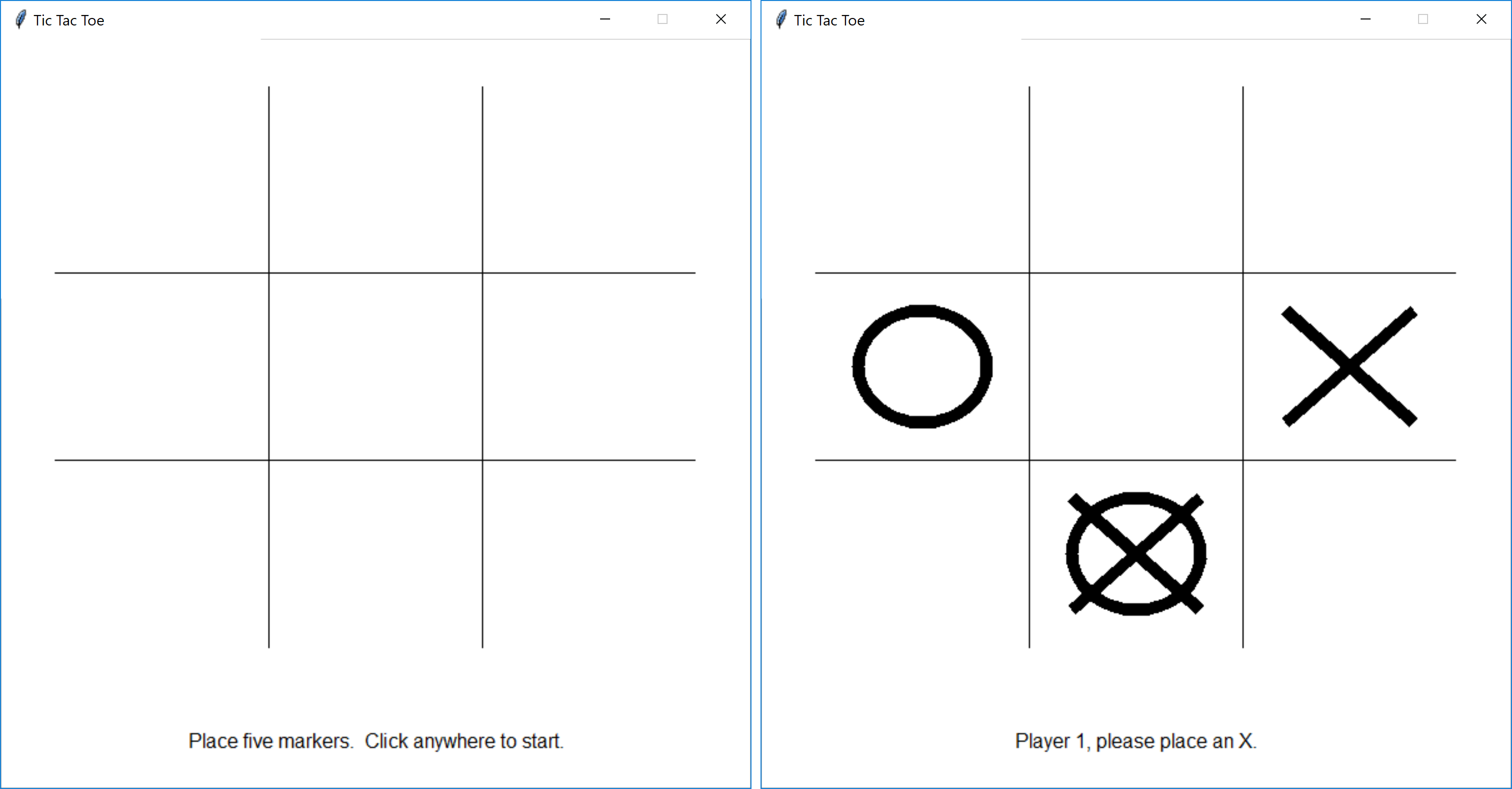
This function should draw a player marker in the grid cell (gridX, gridY). The win parameter is an instance of the GraphWin class, and player is either 1 or 2.
- If
playeris 1, your code should draw an “x” in that cell. Think about how you can use objects ingraphics.pyto make an “x” shape. - If
playeris 2, your code should draw an “o” in that cell.
You can test this function using testDrawPlayerMarker(). By default, this is the only code not commented-out in the if __name__ == "__main__": if statement, so it is all that will run.
if __name__ == "__main__":
    # Problem 1
    testDrawPlayerMarker()

    # Problem 2
##    testPrintBoardState()

    # Problem 3
##    testPlacingValidMarkers()

    # Problem 4
##    playGame()
You should be able to place five markers within the grid. Note that so far, there is no code to make sure that the user can’t place a marker in an occupied space – that comes later.
Problem 2: Keeping track of game state
# You should be fully equipped to complete this problem after lesson 10 (Monday Jan. 27). If you read a little more in chapter 7, you could complete it sooner.
For this assignment, we will represent the 9 grid locations as a nested list, called boardState. This list contains three lists, one for each row. Each inner list contains three elements, one for each position within the row. These elements are either 0 (no marker placed), 1 (player 1 placed an “x”), or 2 (player 2 placed an “o”).
Note: boardState[0] corresponds to the bottom row, not the top.
Here is an example:
# A board where there is:
#   - an "x" in the middle of the bottom row,
#   - an "x" and an "o" in the middle row, and
#   - an "o" in the upper left grid cell.
[[0, 1, 0],
 [1, 2, 0],
 [2, 0, 0]]
For this problem, you will implement the functions needed by the printBoardState function. This function is useful for getting a textual representation of the game, to make sure it matches what is displayed in the game window.
The printBoardState function is already written for you.
def printBoardState(boardState):
    """
    Prints out the current board state for debugging.

    boardState: a nested list containing the board state
    """
    print()

    # Print top row
    printRow(boardState, 2)

    # Divider line
    print("-----")

    # Print middle row
    printRow(boardState, 1)

    # Divider line
    print("-----")

    # Print bottom row
    printRow(boardState, 0)
You should fill in the functions printRow and getCellString.
def getCellString(gridValue):
    """
    Returns a string corresponding to the provided value from the board state.

    gridValue: 0 (none) or 1 (player 1) or 2 (player 2)
    returns: " " (0) or "x" (player 1) or "o" (player 2)
    """
    # TODO: Problem 2
    return "" # replace with your code

def printRow(boardState, row):
    """
    Prints out the current board state of the given row.

    boardState: a nested list containing the board state
    row: the row for which to print the board state
    """
    # TODO: Problem 2
    pass # replace with your code
You can test your code for this problem using the testPrintBoardState function. Just comment-out the call to testDrawPlayerMarker() and comment-in the call to testPrintBoardState().
By default, it tests the example above. You can change this if you want to test other configurations. Here is the example testing results (your code should give the same output):
The boardState list is: [[0, 1, 0], [1, 2, 0], [2, 0, 0]]

o| |
-----
x|o|
-----
 |x|
Problem 3: Checking for valid positions
# You should be fully equipped to complete this problem after lesson 9 (Friday Jan. 24), but you might want to complete Problem 2 first.
Your code from Problem 1 just blindly drew player markers on the board, even if there was already a marker in a given position. For this problem, you will fill in the isValidGridCell and updateBoardState functions.
def isValidGridCell(boardState, gridX, gridY):
    """
    Returns a Boolean indicating whether the given grid position
    is a valid selection given the current board state.
    Also checks if the grid position is within the bounds of the board.

    boardState: a nested list containing the board state
    gridX: the grid x position
    gridY: the grid y position
    returns: True if a piece can be placed at (gridX, gridY),
             False otherwise
    """
    # TODO: Problem 3
    return True # replace with your code

def updateBoardState(boardState, gridX, gridY, player):
    """
    Updates the board state to indicate a player placed
    a marker at the specified grid position on the board.

    boardState: a nested list containing the board state
    gridX: the grid x position
    gridY: the grid y position
    player: 1 or 2
    """
    # TODO: Problem 3
    pass # replace with your code
Once you have completed this implementation, you can test your code using the testPlacingValidMarkers function. This is very similar to the test function for Problem 1, except that it waits until the user clicks a valid grid cell (by calling isValidGridCell), and then updates the board state using updateBoardState before printing out the board state (using printBoardState).
Problem 4: Ending the game
If you take a look at the function playGame, which does the actual game play, the main difference between it and the test functions for Problems 1 and 3 is that instead of only placing 5 pieces, it has a while loop that continues until the game is over. For this last problem, you’ll implement functions that check for the game to have ended.
        # Check if the game is over; if not, switch players
        if didPlayerWin(boardState, player):
            textLabel.setText("Player {0} wins!".format(player))
            isGameOver = True
        elif isDraw(boardState):
            textLabel.setText("The game is a draw.")
            isGameOver = True
        else:
            player = 3 - player # switches between 1 and 2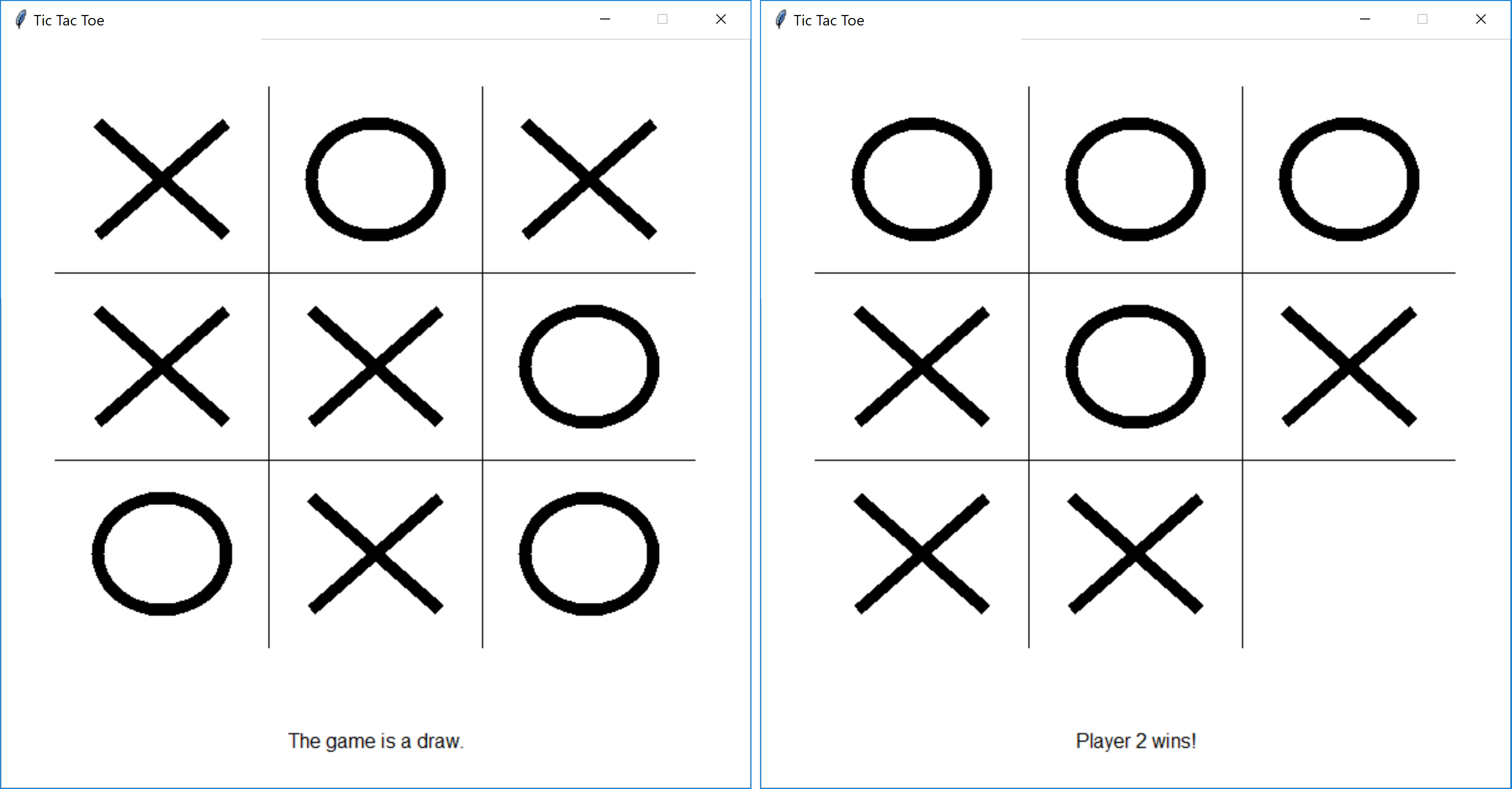
Part a: It’s a draw
# You should be equipped to complete this problem after lesson 9 (Friday Jan. 24).
The game ends in a draw when all grid positions are filled but no one has won. For now, you don’t have code to check for a winner, but you can use isDraw to at least end the game loop.
Implement the function isDraw. This function should assume neither player has won, and thus only check if any grid position is not marked.
def isDraw(boardState):
    """
    Returns a Boolean indicating whether the game has ended in a draw.
    Assumes neither player has won.

    boardState: a nested list containing the board state
    returns: a Boolean (True if the game is a draw, False otherwise)
    """
    # TODO: Problem 4a
    return False # replace with your code
You can use the actual playGame function to test this code. By default, didPlayerWin always returns False, so for now the game should only end once nine markers have been placed (even if a player should have won).
Part b: Checking for a victory
# You should be equipped to complete this problem after lesson 9 (Friday Jan. 24).
The game ends when a player has markers in an entire row, column, or full diagonal. This is checked in the function didPlayerWin.
def didPlayerWin(boardState, player):
    """
    Returns a Boolean indicating whether the player has
    won the game.

    boardState: a nested list containing the board state
    player: 1 or 2
    returns: a Boolean (True if the player won, False otherwise)
    """
    # First, check the rows
    for row in range(3):
        if didPlayerWinWithRow(boardState, player, row):
            return True

    # Second, check the columns
    for col in range(3):
        if didPlayerWinWithColumn(boardState, player, col):
            return True

    # Finally, check the diagonals
    if didPlayerWinWithDiagonal(boardState, player):
        return True

    # No win condition was met
    return False
For this last subproblem, you should implement all of the helper functions needed to determine if a win condition has been met.
def didPlayerWinWithRow(boardState, player, row):
    """
    Returns a Boolean indicating whether the player
    won the game due to the given row.

    boardState: a nested list containing the board state
    player: 1 or 2
    row: 0, 1, or 2
    returns: a Boolean (True if the player has an entire row,
             False otherwise)
    """
    # TODO: Problem 4b
    return False # replace with your code

def didPlayerWinWithColumn(boardState, player, col):
    """
    Returns a Boolean indicating whether the player
    won the game due to the given column.

    boardState: a nested list containing the board state
    player: 1 or 2
    col: 0, 1, or 2
    returns: a Boolean (True if the player has an entire column,
             False otherwise)
    """
    # TODO: Problem 4b
    return False # replace with your code

def didPlayerWinWithDiagonal(boardState, player):
    """
    Returns a Boolean indicating whether the player
    won the game due to either diagonal.

    boardState: a nested list containing the board state
    player: 1 or 2
    returns: a Boolean (True if the player has an entire diagonal,
             False otherwise)
    """
    # TODO: Problem 4b
    return False # replace with your code
Now if you test your code with the playGame function, it should end when there is a victory, and update the text label at the bottom of the window to say who won.
What you should submit
You should submit a single .zip file on Moodle. It should contain the following files:
readme.txt(collaboration statement listing collaborators and form of collaboration)tictactoe.py(all problems)