In the XWindows
system, the term “window” most generally refers simply to a rectangular
region
on the screen. This definition includes
not only the objects that we typically think of as windows –a Mozilla browser or a text file opened in Emacs – but also several other objects such as
the Linux
tool bar and the screen background. In
fact, on our test machines (machine specs here), XWindows
identifies about
750 windows that are part of the basic operating
system, most
of which are either completely invisible or don’t look like a “window”
in the
way most users think of them.
XWindows
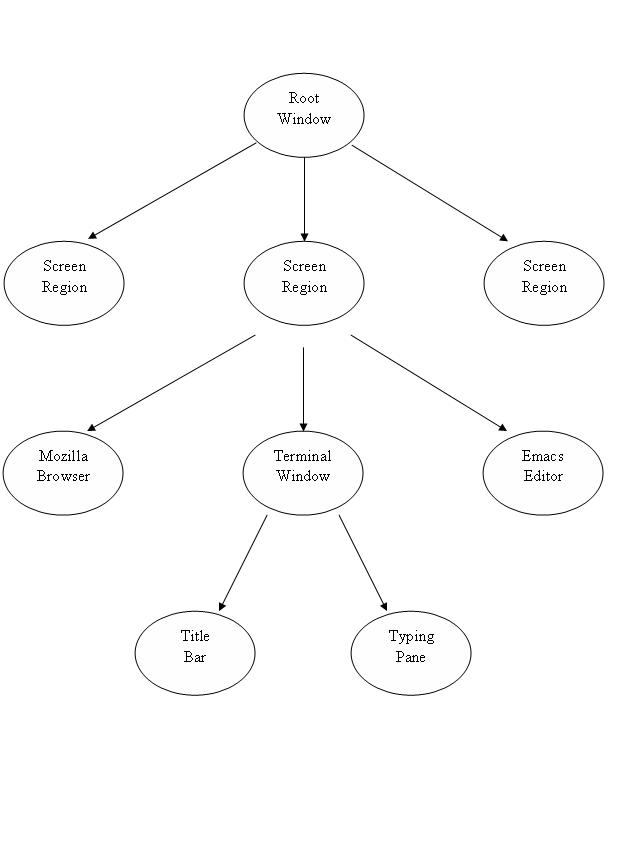
stores the window information in a tree structure, with each node in
the tree
corresponding to a single window. A
window can have any number of child windows, but each window has only
one
parent. There is a single root window at
the top of the tree from which all of the other windows are descended. The objects that most of us think of as
“windows” reside around the third or fourth level of the tree, and most
are not
the lowest children but have several child windows themselves. An example will help illustrate this.
The image below shows a standard Linux desktop with
a Terminal window open. In a sense, the
root window is visible in this picture, since by definition the root
window
occupies the entire screen, but everything that we see is really a
child of
that root window, not the root window itself.
The root window has a child window that acts as a parent for all of the window in a particular region of the
screen. One of those children is the
Terminal window
we see in the picture. This Terminal
window is further subdivided into child regions, such as the Title bar
for the
window and the typing pane. The precise
regions will tend to vary from application to application.
The good news is that in general, programmers using the XWindows libraries don’t need to worry about
most of this
complexity. The commands built into XWindows are generally robust and smart enough
to take into
account many of the problems you might expect to arise.
For instance, although a Terminal window
contains a number of subwindows, when the XMoveWindow command is called on the Terminal
window parent
(the one that appears at the third level of the tree in the above
diagram), XWindows
is smart enough to
automatically move all of the Terminal window’s children to their
correct
positions. The same is true of other XWindows commands, making the whole system
extremely
powerful.
Our
Interface to the XWindows System
The core of the XWindows system
is several years old, and the library functions are written in basic C. The system includes several data structures,
but it is not object-oriented and as such can be conceptually difficult
to use
in large programs. One of the first
tasks in the Chimera project was to build an object-oriented system in
C++ to
make as many of the XWindows library calls
as
possible.
To this end, Chimera uses a C++ data structure called a BDS_Window_Tree_Node to store information about
a particular
window as represented by XWindows. The files window_tree_node.h
and window_tree_node.cpp contain the
relevant code
(the BDS prefix refers to the initials of the programmer who created
the
classes, in order to minimize the possibility of name collisions as the
Chimera
project grew in size). This class’s
primary function is to store commonly used information about a window
so that
it does need to be recomputed, and to provide a simpler interface than
the XWindows libraries to that information. In the Chimera Dialogue Manager, the function
make_window_tree(Display *) is used to store all of the current
window
information in a tree of these classes.
The function returns a dynamically-allocated pointer to the root
of the
tree that must be deleted when the tree goes out of scope.
Anyone attempting to extend or otherwise modify the
Chimera source code should be aware that not all of the functions
provided by
the BDS_Window_Tree_Node class behave
exactly as the
corresponding XWindows library functions
do. For instance, the Window structure
from the XWindows library stores the
location of the window relative
to that window’s immediate parent, while the version of the function in
the BDS_Window_Tree_Node class returns the
window’s absolute
position. These differences are
documented in the header file for the class (or will be, anyway).
Actuators
Once the task to be performed has been identified using
language tools, the Chimera system relies on a family of Actuator
classes to
perform the different operations. In
general, each Actuator class is responsible for handling a particular
kind of
action, such as moving windows or launching applications.
In some cases, an Actuator class is
responsible for several actions that rely on similar information. Chimera’s Mozilla_Actuator
and Dumpad_Actuator classes each handle a
number of
different operations for their related applications.
All Actuator classes used by Chimera are derived from a
common base class called Abstract_Actuator. The Abstract_Actuator
specifies a set of pure virtual functions that all Actuator classes
must
implement. In addition to a contructor and destructor, all Actuator classes
must
provide definitions for the following functions:
int Actuator::activate();
void Actuator::undo();
void Actuator::redo();
There
may
be some Actuators for which some of these functions do not really make
sense
(for instance, the DumPad application
allows saving,
which is not generally something a user wants to undo).
Functions of this type are given empty
definitions in all of the Actuator classes used in Chimera, and
extensions to
the program are encouraged to do the same.
In
some
cases, Actuators may be logically grouped into families with a number
of
features common to all. In this case, it
makes sense to derive a new class for the family from the Abstract_Actuator
class, and then make all of the Actuators in the family derive from
this new
class. This is how the various window
Actuators used by Chimera are implemented, with the Window_Frame
class providing common functionality with classes for specific
Actuators such
as Window_Move_FrameWindow_Cascade_Frame
derived from it. Since windows are
identified in the same manner in all cases, the constructor for the Window_Frame class is responsible for
identifying these
fields and storing them in member data, while the derived classes know
how to
pick out the fields specific to them. In
fact, there is enough commonality among the window Actuators that the Window_Frame class can define a general Window_Frame::activate() function that
most of the derived classes can use (the word “most” is used because at
various
stages in the Chimera project, some of the window Actuator classes have
had to
override this with their own versions of the activate() function when
special
functionality is required). As another
example, if a whole suite of applications were written to accompany the
DumPad, a family of Actuators, or one
Actuator with a
general-purpose interface, might be used to communicate with them.
and
Interaction
Between Actuators and the Window Tree
The functions available in the BDS_Window_Tree_Node
class are mostly useful for writing Actuator classes that manipulate
windows in
some way. All of the
window Actuators in Chimera use a BDS_Window_Tree_Node
object pointing to the root of the window, together with the text
information
from the
This system is nicely flexible in a number of ways.
Because the information about how to locate a
window is stored in a special data structure, it is a relatively simple
matter
to add new ways to identify windows. The
Chimera system supports recognizing windows by title, location, and
size, but
it order to add a new type of identification – say, location relative
to
another window – all that you would have to do would be to modify the
data
structure and the Window_Frame::activate()
function, and to add code for how to sort the windows
based on this new information. For this
last step, there are a number of existing sorting functions for the
windows
that could be easily modified.
Furthermore,
because the windows are sorted in a particular order, it would be
relatively
simple to add code to allow the user to correct the Actuator if it
chooses the
wrong window. An offset of 1 would have
it pick the runner-up for best match, 2 for the next best after that,
and so
on. Speech recognition difficulties with
these kinds of commands made this a low priority in the Chimera project.
Chimera
Architecture
Chimera is a general-purpose tool designed to enable
specific voice commands on the Linux operating system.
Using a microphone to capture speech, the
user can issue commands such as “Move the Terminal window right”, “Make
the text
editor larger”, or “Launch a web browser and go to Google”. Chimera makes it easier for users to do
multiple tasks at once by speaking and typing at the same time, and
provides a
simple interface for commands that can easily be put into words but may
be hard
to achieve with a mouse and keyboard, such as “Line up all of the
windows on
the screen”.
Chimera consists of a number of different components that
work together to turn request into action.
The Sphinx-2 software from
Once
these
issues have been dealt with, the Dialogue Manager uses some of the
information
it got from